How we can create Admin UI in openemr as below :
- What files [ in which path ] we need modify to create UI as below :
How we can create Admin UI in openemr as below :
To modify the OpenEMR UI (User Interface), you can follow these general steps depending on what part of the UI you want to customize — whether it’s colors, layout, forms, menus, or entirely new modules.
 1. Customize Themes (CSS)
You can modify the visual appearance (colors, fonts, layout) through the themes.
Files to Edit:
interface/themes/ – contains themes like style_cobalt.css, style_light.css, etc.
Modify or duplicate a file like:
interface/themes/style_cobalt.css
Example: Change background color
body {
background-color: #1e1e2f; /* Dark blue background */
color: #ffffff;
}
 2. Modify Menus / Navigation
Edit the menu_template.php file if you’re using the default layout engine.
File:
interface/main/tabs/menu_template.php
You can change or add menu items using:
 3. Edit Forms / Layout-Based Forms (LBF)
To modify custom intake forms and UI layouts:
Navigate in OpenEMR to:
Admin → Forms → Layouts
Or modify in the DB:
SELECT * FROM layout_options;
You can change:
Field labels
Input types (text, date, radio)
Conditional display rules (“Hide this field if…”)
 4. Modify Page Content or Add New Pages
You can modify specific modules like:
interface/patient_file/summary/demographics.php
interface/forms/ (for clinical forms)
To add a new page:
Create interface/forms/custom_form/new.php
Add HTML + PHP logic to it.
Register the form in the OpenEMR GUI under Admin → Forms.
 5. Advanced: Modify Angular Frontend (OEMR v6+)
Some parts of OpenEMR now use Angular, especially Patient Portal and API interfaces.
Angular code: interface/weno/ and newer modules
React-based components: (some newer interfaces)
If you’re customizing the Patient Portal UI:
portal/ (for legacy)
react-portals/ (for new versions using React)
Pro Tip: Always Backup
Before editing:
cp -r openemr/ openemr_backup/
Useful Dev Tools
Use Chrome DevTools (F12) to inspect UI elements and find relevant CSS/HTML
Use VSCode for editing .php, .css, .js files
Let me know what specifically you want to change — like:
Color theme?
Intake form layout?
Patient summary page?
Menu structure?
I can give you exact file paths and code examples.
Hi
I’m using OpenEMR version 7.0.3
I need to customize main menu calender, Finder, Flow etc should be vertical left nav bar something like this
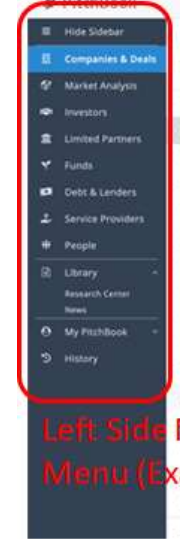
Calender
Finder
Flow
Recalls
Which CSS file i have to change to get vertical left nav bar.
Browser:
I’m using chrome.
Operating System
I’m using: Windows 10
Looking forward your reply. Thanks
Is this a module or a modification of the core code?
Hi
I need main menu as vertical instead of horizontal position? Thanks
@kanmaniguna that is something you will have to build yourself. History: When the frame type system the left hand menus were built out of were deprecated by browsers. The leads at the time decided to go with the top level menu instead of replacing the left menu with DIVs. The engineer that wrote the current menu system using Knockout JS was accepted because there was no competing code to refactor the side menu. If you go back to version 4, you can pickup the side menu there. The challenge would be to modernize the menu system and bring it forward. Or you can write a module that can allow you to choose between top level menu or left menu. This is my two cents.
Hi Sherwin
Thanks for your response.
